EMBER ECHO

WARM ANALOG DELAY  ·  WHITE RIVER AUDIO
User Guide
Version 0.5.0

Ember Echo is a warm, analog-style delay. Each repeat passes through a choice of four characters (tube, tape, transformer or bucket-brigade), so the echoes darken, thicken and drift like hardware while the dry signal stays clean, unless you choose to drive it too.
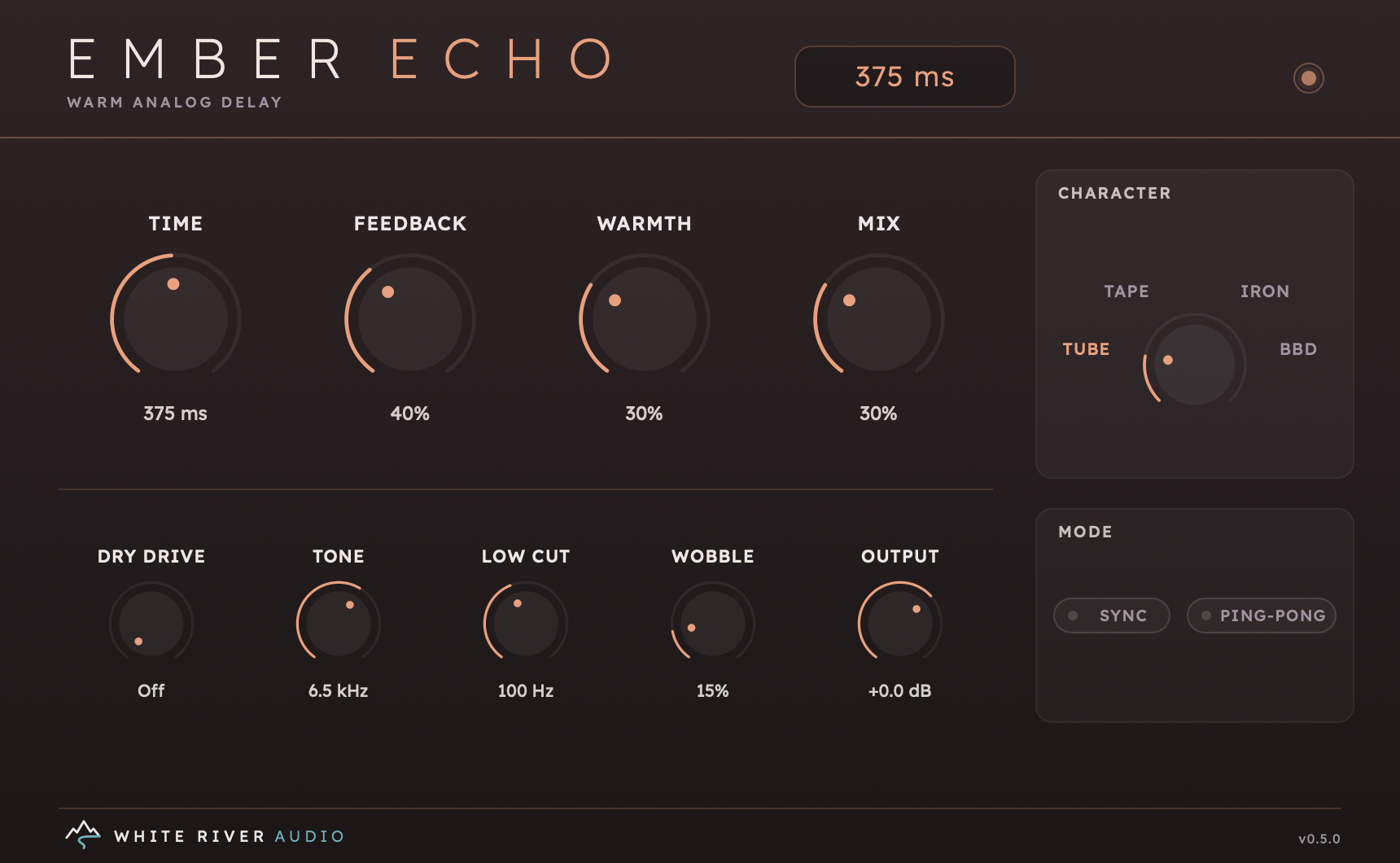
The Ember Echo window 1 2 3 4 5 6 7 8 9 10 11 12 13 14
DISPLAY 1Time display 2Status light CONTROLS 3Time 4Feedback 5Warmth 6Mix 7Dry Drive 8Tone 9Low Cut 10Wobble 11Output 12Character 13Sync 14Ping-Pong

Quick start

  1. Insert Ember Echo on a track or an effects send. On a send, set Mix 6 to 100%.
  2. Set the time with Time 3, or press Sync 13 to lock it to the song's tempo as a note value.
  3. Pick a Character 12 and set Warmth 5 for how coloured the repeats are.
  4. Set how long it rings with Feedback 4, and how dark the repeats become with Tone 8.
Ember Echo 0.5.0 · White River Audio1

What you see

1Time display

The delay time in milliseconds, or the note value when Sync is on.

2Status light

Glows with Warmth and breathes a little with the signal; Dry Drive warms it toward red.

The controls

3TIMEdefault 375 ms, 10–2000 ms The delay time. With Sync on, this knob becomes a note value (default dotted eighth).
4FEEDBACKdefault 40%, up to 110% How much of each repeat feeds back. Above 100% the echoes build up into self-oscillation, held in check by the character's saturation. Change it: lower for a single slap; higher for long, decaying trails.
5WARMTHdefault 30% How hard the repeats drive the selected Character. Each repeat passes through it again, so later echoes get warmer and softer. Change it: higher for colourful, saturated echoes; lower for cleaner repeats.
6MIXdefault 30% The balance of echo against the dry signal. Change it: 100% on an effects send.
12CHARACTERdefault Tube The colour of the repeats. Tube: warm, mostly 2nd harmonic, the lows kept tight. Tape: soft and round, with a low bump and softened highs. Iron: transformer weight; the lows saturate first. BBD: the dark, lo-fi sound of a bucket-brigade chip, with extra wobble. Click a name, click the switch to step, or drag.
7DRY DRIVEdefault Off Saturates the dry signal only, through the same Character. The echoes are not affected by it (their colour is Warmth). At Off the dry signal passes clean. The level stays about the same up to the middle of its range. Change it: turn up to warm the source itself, like running it through a preamp.
Ember Echo 0.5.0 · White River Audio2

The controls (continued)

8TONEdefault 6.5 kHz, 800 Hz–18 kHz A low-pass filter in the feedback loop: each repeat gets a little darker. Change it: lower for dark, vintage echoes; higher for bright, clear ones.
9LOW CUTdefault 100 Hz, 20–1000 Hz A high-pass filter in the feedback loop, so the repeats don't build up low end. Change it: higher to keep echoes out of the bass and kick.
10WOBBLEdefault 15% Wow and flutter: the slow pitch drift and fast waver of tape and old delay chips. Change it: higher for a woozy, lo-fi feel; 0 for steady repeats.
11OUTPUTdefault 0 dB, −24 to +12 dB A fixed level trim.
13SYNCdefault off Locks the delay time to the song's tempo; the Time knob becomes a note value.
14PING-PONGdefault off The repeats alternate between left and right.
Ember Echo 0.5.0 · White River Audio3

Good to know

Where it goes

Late in the chain: after level, tone and clarity processing, before reverb. On a vocal, a very low Mix adds depth without an obvious echo.

Insert or send

As an insert, use Mix to blend. On an effects send, set Mix to 100% and control the amount with the send level.

Self-oscillation

Above 100% Feedback the echoes grow until the Character's saturation holds them. It is safe, but turn Feedback back down to let the sound die away.

Latency

The dry path adds 3 samples of latency, reported to the host, so everything stays in time.

Ember Echo 0.5.0 · White River Audio4