EMBER GLOW

WARM SATURATION  ·  WHITE RIVER AUDIO
User Guide
Version 0.3.0

Ember Glow is a warm saturator with four characters, from subtle tube warmth to full distortion. The level stays roughly the same as you drive it, so you can judge the colour rather than the loudness, and it runs at high oversampling so even heavy settings stay clean of aliasing.
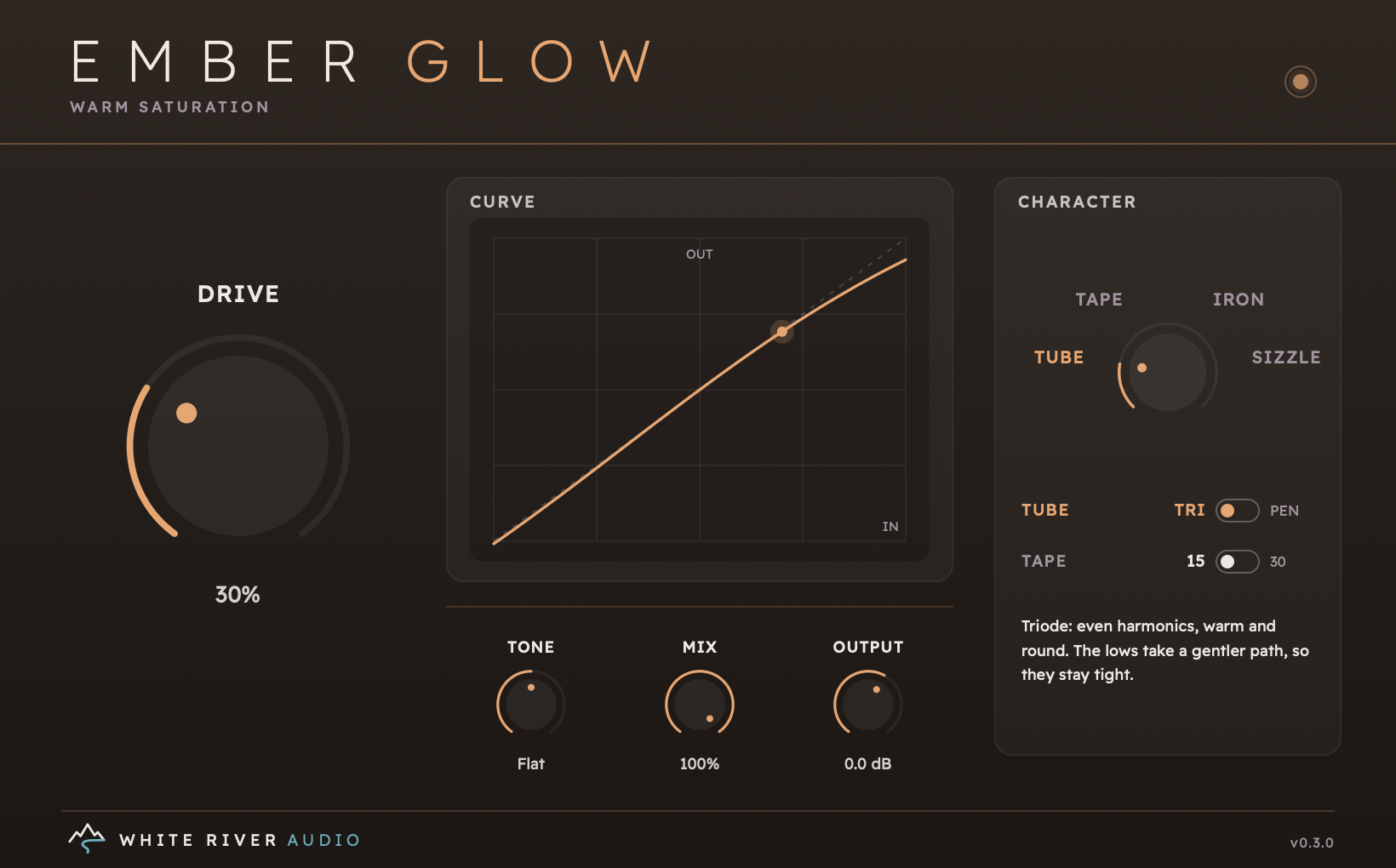
The Ember Glow window 1 2 3 4 5 6 7 8 9
DISPLAY 2Curve 3Status light CONTROLS 1Drive 4Tone 5Mix 6Output 7Character 8Tube type 9Tape speed

Quick start

  1. Insert Ember Glow on a track or bus where you want warmth or grit.
  2. Pick a Character 7 with the switch. For Tube and Tape, choose the variant with the small switch on their row 89.
  3. Turn Drive up 1 until you hear the colour you want. Most of the knob's travel is in the subtle range.
  4. Shape it with Tone 4, and blend it with the clean signal using Mix 5 for parallel saturation.
Ember Glow 0.3.0 · White River Audio1

What you see

2Curve

The transfer curve at the current settings: input left to right, output upward. The straight diagonal is clean; the more it bends, the more it saturates. The dot shows where the signal's peaks are hitting it.

3Status light

Glows brighter with Drive and breathes a little with the signal; Sizzle warms it toward red.

Description

The text under the switches describes the selected Character in a sentence.

The controls

1DRIVEdefault 30% How hard the signal hits the curve. 0% is clean. The level stays roughly the same as you turn it. Change it: a little for warmth on vocals and mixes; more for grit on drums, bass and guitars.
7CHARACTERdefault Tube Tube: the signal above 220 Hz drives the tube while the lows take a gentler path, so bass stays tight. Tape: soft, rounded odd harmonics with a low-end bump and softened highs. Iron: transformer weight; the lows thicken and saturate first. Sizzle: two stages like a cranked preamp, from a gritty edge to full distortion, with the low end kept solid. Click a name, click the switch to step, or drag.
8TUBE TYPEdefault TRI TRI (triode): warm and round, mostly even harmonics. PEN (pentode): more gain and a harder knee, brighter, forward and cutting. Lit only while Tube is selected.
9TAPE SPEEDdefault 15 15 ips: a deep low bump and a softer top. 30 ips: a tighter bump, more top end and more headroom, cleaner and punchier. Lit only while Tape is selected.
4TONEdefault Flat Tilts the saturated sound around 1.2 kHz: up to 4 dB brighter on top and less on the bottom, or the reverse.
5MIXdefault 100% Blends the saturated signal with the clean one (parallel saturation). The two are perfectly aligned, so in-between settings never comb-filter. Change it: lower to add heavy saturation underneath a clean sound.
6OUTPUTdefault 0 dB, −18 to +12 dB A fixed level trim.
Ember Glow 0.3.0 · White River Audio2

Good to know

Level

Each Character has a make-up gain worked out from its curve, so a typical signal comes out at about the level it went in. It never rides the level: quieter material comes out a little louder at high Drive, as with any saturator.

Where it goes

Anywhere colour is wanted: after the track's EQ and compression, or on a bus. On a vocal, after level control.

Latency

Ember Glow adds 65 samples of latency (about 1.4 ms at 48 kHz), reported to the host, so everything stays in time.

Hover for hints

Hold the mouse over a control for a short explanation.

Ember Glow 0.3.0 · White River Audio3