Laminar levels a vocal track the way an engineer does with a hand on the fader and a couple of compressors: it lifts quiet lines, pulls loud ones down, catches sharp peaks and smooths the inside of the notes, while leaving breaths and noise alone. It learns the singer's normal level from the first 30 seconds of singing, and from then on every playback and bounce of the song sounds exactly the same.
1
2
3
4
5
6
7
8
9
10
11
12
13
14
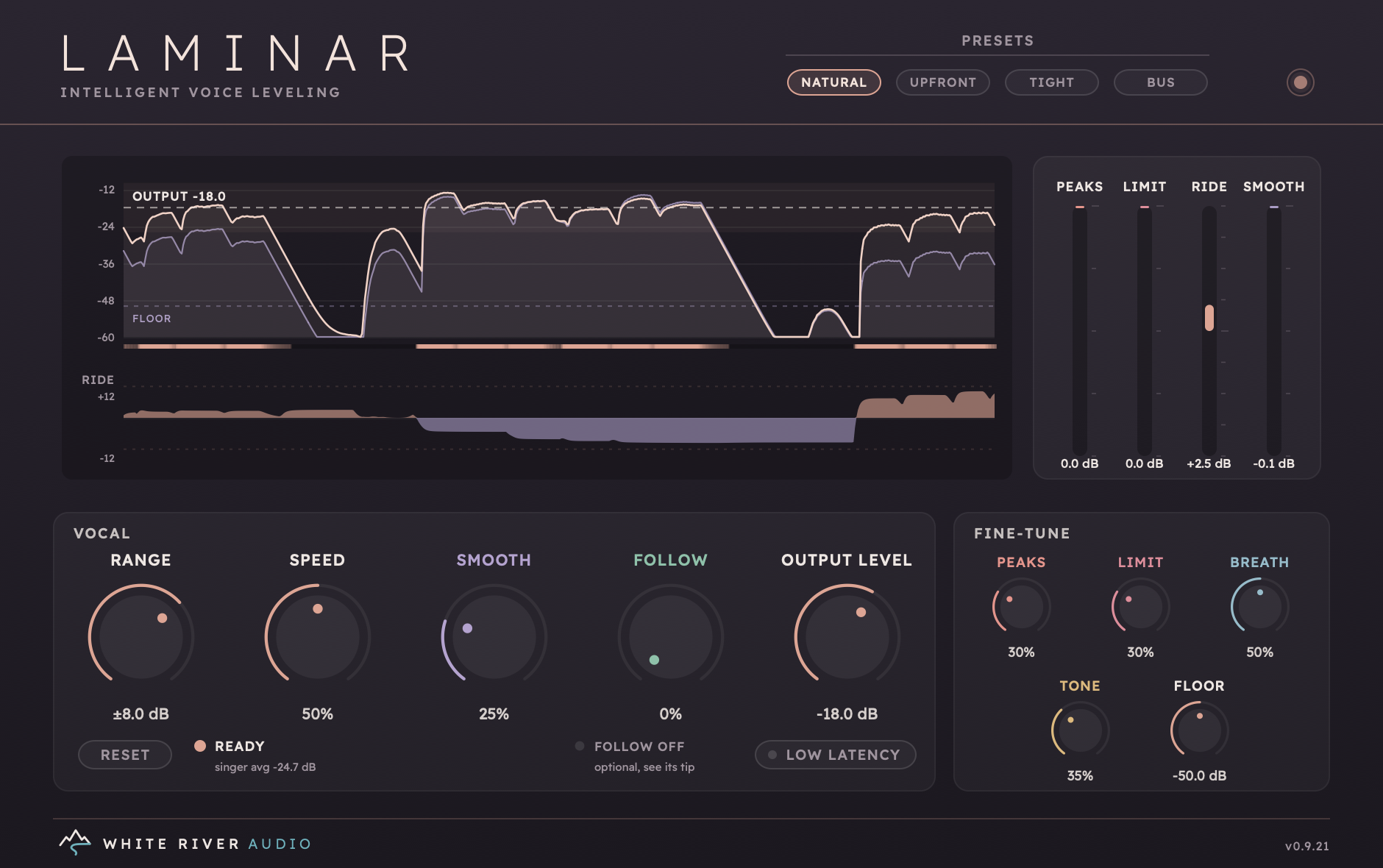
Lilac: the vocal as it arrives. Rose: the vocal after Laminar. The dashed OUTPUT line is where Output Level puts the singer's average, and the dashed FLOOR line marks the level below which nothing is lifted. When a band is on the sidechain, a green line shows its level.
The lane underneath, RIDE, shows the rider's moves: lifts upward in rose, cuts downward in lilac.
Softly lit while Laminar is loaded; brightens with sound and glows fully while Laminar hears singing.
PEAKS: the fast peak stage. LIMIT: the safety limiter; it reads TOO HOT when Output Level is set so high that the ceiling keeps working. RIDE: the rider's current lift or cut. SMOOTH: the opto-style stage.
LISTENING n% learning the singer's level. READY set and saved with the session, with the singer's average shown below. INPUT TOO QUIET all of the singing is under Floor: add gain on the track.
FOLLOW OFF the default. With Follow turned up: BAND CONNECTED and how far it moves the vocal, or NO SIDECHAIN when nothing arrives on the sidechain.
| 4PRESETSdefault Natural | Starting points that set Range, Speed, Smooth and the fine-tune controls together (never Output Level or Follow). Natural evens out lines and lets words keep their shape. Upfront gives a steadier vocal. Tight evens out nearly every word. Bus is gentle glue for a group of voices. The caption reads PRESETS (CUSTOM) once a control has been changed. Change it: start with Natural; move up a step if the vocal still wanders. |
| 5RANGEdefault ±8 dB, 0–12 dB | How far Laminar may lift quiet lines and pull loud ones down. Change it: higher if quiet lines still get lost; lower if the vocal sounds over-controlled. |
| 6SPEEDdefault 50% | Whole lines are always evened out. Speed sets how much the words inside a line are evened out too: low keeps their natural shape, high evens out single words. Change it: higher if single words jump out; lower if you hear pumping. |
| 7SMOOTHdefault 25% | An opto-style compressor at the end of the chain that works gently inside the notes, the part the rider deliberately leaves alone. 0% is off. Change it: higher for a denser, more polished vocal; 60–70% keeps a natural shape. |
| 8FOLLOWdefault 0% (off) | Optional. With the band on Laminar's sidechain, the vocal rises and falls with the band, for example coming up in a louder chorus. Laminar is complete without it. Fader moves on whatever feeds the sidechain count as the band getting louder or quieter, so plan the routing before you rely on it. Change it: leave off unless the vocal gets buried when the band gets louder. |
| 9OUTPUT LEVELdefault −18 dB, −30 to −10 dB | How loud the vocal comes out of Laminar, on average: Laminar puts the singer's average here and rides around it. It is gain staging for whatever follows; the track fader sets the balance in the mix. Change it: only if LIMIT says TOO HOT (down) or the next plugin wants a hotter signal (up). |
| 10RESET | Forgets what Laminar learned and starts listening again. Use it after replacing the take, or after changing the vocal's level before Laminar. Otherwise a session reopens exactly as it was saved. |
| 14LOW LATENCYdefault off | For recording: Laminar's delay drops from 64 ms to about 1 ms, so a singer can listen through it while recording. Everything keeps working; each word's level settles in its first moments instead of being set just before it. See Recording through Laminar. Change it: on while recording vocals through Laminar, off for mixing. |
| 13PEAKSdefault 30% | Catches sharp peaks the moment they happen (hard consonants, punched word starts), first in the chain, like a fast compressor. Normal singing is left alone. Change it: set to 0% if you already use your own fast compressor before Laminar. |
| LIMITdefault 30% | A safety limiter after the rider that looks ahead 4 ms and dips just enough that nothing pokes through. 0% is off. |
| BREATHdefault 50% | Breaths and noise between words never get the lift the singing gets; above 50% they are also dipped a little. Consonants count as part of their word. Change it: higher if breaths are distracting; lower if they sound choked off. |
| TONEdefault 35% | Softens the harsh upper mids of loud singing, and adds a hint of warmth to lines Laminar lifts. Change it: higher if loud lines sound harsh; lower if they lose edge you want. |
| FLOORdefault −50 dB | Anything quieter is never lifted (room noise, bleed from other mics). Change it: raise it if bleed gets lifted; lower it only for a very quiet recording. |
Laminar normally delays the vocal by 64 ms: it hears each word 60 ms before you do, so it can set the word's level just before it starts. Your DAW makes up for this delay on playback, so it is never heard while mixing. It only matters when someone sings through Laminar while recording and hears themselves in headphones: 64 ms late is very distracting. For that, switch on LOW LATENCY 14: the delay drops to about 1 ms.
Only the lookahead. In normal mode Laminar sets each word's level just before the word starts; in Low Latency the level settles in the word's first moments (about 25 ms), a little like a compressor's attack. Measured on real vocals, the result stays within about 1 dB of normal mode on most word starts; the punchiest words can come through a few dB hotter for an instant. Fine for a headphone mix; for mixing, normal mode is smoother.
Changing the delay while the DAW is playing makes it re-align the tracks mid-playback. Switching while stopped keeps everything clean.
Only if the vocal you keep is quite different from what Laminar first heard: it learned from a quiet warm-up or scratch take, the final takes are much stronger, or you changed the gain before Laminar. Press Reset and play 30 seconds of the final vocal.
No need for Low Latency. Laminar's delay only affects the signal that passes through it: your DAW plays the vocal track early to keep it in time, so a guitar recorded against it stays in time and its monitoring isn't delayed. The exception is Laminar on a bus or the main output that the live signal also passes through. Make sure the DAW's plug-in delay compensation covers all tracks and buses (usually the default).
After clean-up and tone correction, before effects. With other White River plugins the usual order is Lustra, Laminar, then Clarion; effects such as Ember Echo come after.
Laminar learns only from singing. The singer's average is set after about 30 seconds of it and saved with the session; every playback starts from the same state, so passes and bounces are identical. Only Reset starts the learning again.
Laminar levels the vocal, so a level change made before it (region or clip gain) is mostly levelled back. To make a line louder in the mix, use volume automation on the track: it comes after the plugins.
It is usually covered rather than low: sung darker, or with an instrument playing in the 1–4 kHz range that carries the words. More level won't uncover it; more presence will, from an EQ lift around 2–3 kHz, Lustra, or by cutting the competing instrument there.
Use the Bus preset on a backing-vocal or vocal bus: the compressor stages do most of the work and the sections keep their shape.
Laminar is not a de-esser or a tone EQ.