Lustra is a corrective EQ for vocal tracks. It analyzes the first 30 seconds of singing on the track and builds a correction to match: it reduces muddiness, honk and resonances, and restores presence and air where they are lacking. Because the correction comes from the track itself, a dark, boomy vocal and a thin, bright one receive opposite treatment. Lustra adds no latency and never changes the track's level on its own.
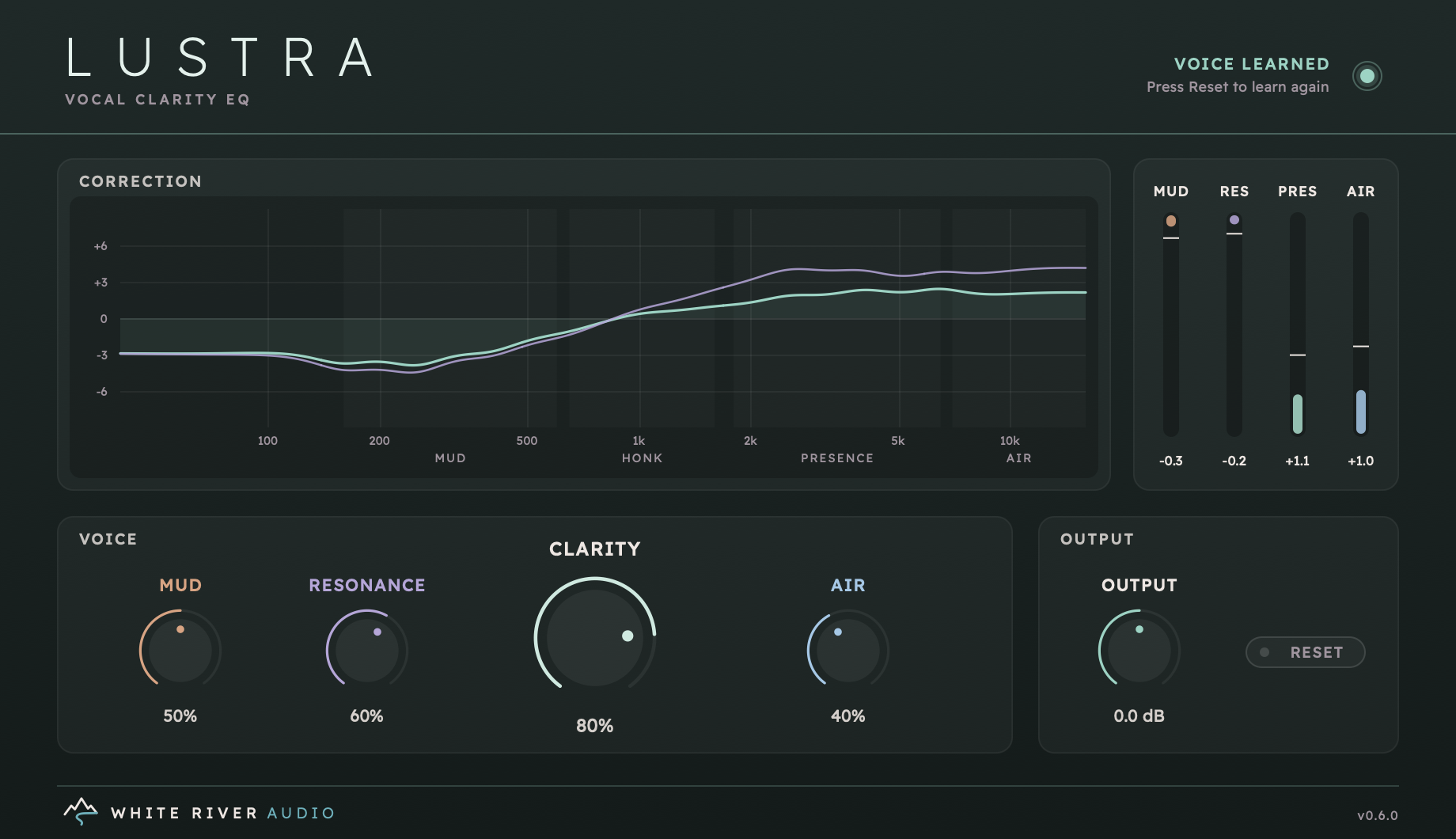
1
2
3
4
5
6
7
8
9
Mint: the learned correction. It stays fixed until you press Reset.
Lilac: the total EQ right now, including the parts that move with the performance.
The shaded regions mark the four ranges Lustra works on. Narrow dips in the curve are fixed resonances it found (see Resonance).
WAITING FOR SINGING light dark: no singing detected yet.
LEARNING THE VOICE light pulses (only while it hears singing): learning the track.
VOICE LEARNED light on: correction set and saved with the session.
The current amount of each moving correction, in dB. Mud and Res show cuts; Pres and Air show lifts. The short line marks the most recent peak.
| 4CLARITYdefault 80% | Sets the amount of two things. The learned correction: a fixed EQ that evens out this singer's tone (a dull voice gets a few dB more presence and air, a bright one a small trim). The presence lift: a broad boost around 2.5 kHz that brings the words back on lines sung darker than usual, up to 6 dB at 100%; the Pres meter shows it. At 0% both are off; Mud, Resonance and Air keep working. Change it: lower for dark backing vocal pads; higher for a dull or muddy recording. |
| 5MUDdefault 50% | A low-mid cut that follows the performance. When the singer moves closer to the mic or sings lower, the low mids build up; Lustra reduces them while it lasts and releases as soon as the balance returns. Typically 1–2 dB, at most 6 dB. Change it: higher for a singer who works close to the mic; lower if low notes start to sound thin. |
| 6RESONANCEdefault 60% | Honk and ringing. A broad cut follows nasal vowels (around 630 Hz to 1.6 kHz) when they swell; sung notes are left alone. Up to four steady resonances from the mic, the room or the voice get narrow notches, found while learning and shown on the curve. Change it: higher for a nasal or ringing recording; lower if the vocal loses character. |
| 7AIRdefault 40% | A lift above 7 kHz on open vowels (2 dB at the default, up to 5 dB) that pulls back instantly on S's, T's and breaths, adding sheen without increasing sibilance. Change it: higher for a dull vocal; lower or off for a bright one, or if you add air elsewhere in the chain. |
| 8OUTPUTdefault 0 dB, ±12 dB | A fixed level trim for matching the bypassed level. |
| 9RESET | Clears what Lustra learned and starts listening again. Use it after replacing the take or moving Lustra to a different track; otherwise the learned correction is saved with the session. |
Place Lustra before compression and saturation so they respond to the corrected vocal. With other White River plugins, the usual order is Lustra, Laminar, then Clarion.
Lustra learns only from singing; silence, bleed from other mics, breaths and S's are ignored. If a track has between 10 and 30 seconds of singing, the correction is set at the next playback start. Every playback starts from the same state, and the session reopens exactly as saved. Only Reset starts the learning again.
The track is probably too quiet. Lustra ignores anything below −46 dBFS so that bleed is not mistaken for singing. Raise the track's gain ahead of Lustra.
Lustra measures each track against a built-in profile of a well-balanced lead vocal. Dark, sustained vocal pads that are meant to sit behind the lead are therefore brightened as if they were a dull lead. On those, set Clarity to 30–50%, or bypass Lustra.
When a singer's notes sit at 200 Hz and above, the low mids are the body of the voice rather than mud, so Lustra limits its cut there to 2 dB.
Lustra is not a de-esser or a compressor.